> ## Documentation Index
> Fetch the complete documentation index at: https://docs.agentset.ai/llms.txt
> Use this file to discover all available pages before exploring further.
# Quickstart
> Get started with Agentset in minutes
In this guide, you'll upload a document to Agentset, search it, and generate a response using the retrieved context.
## Step 1: Get your API key
1. [Sign up](https://app.agentset.ai) and create an organization
2. Create a namespace from the dashboard
3. Navigate to **Settings → API Keys → New API Key**
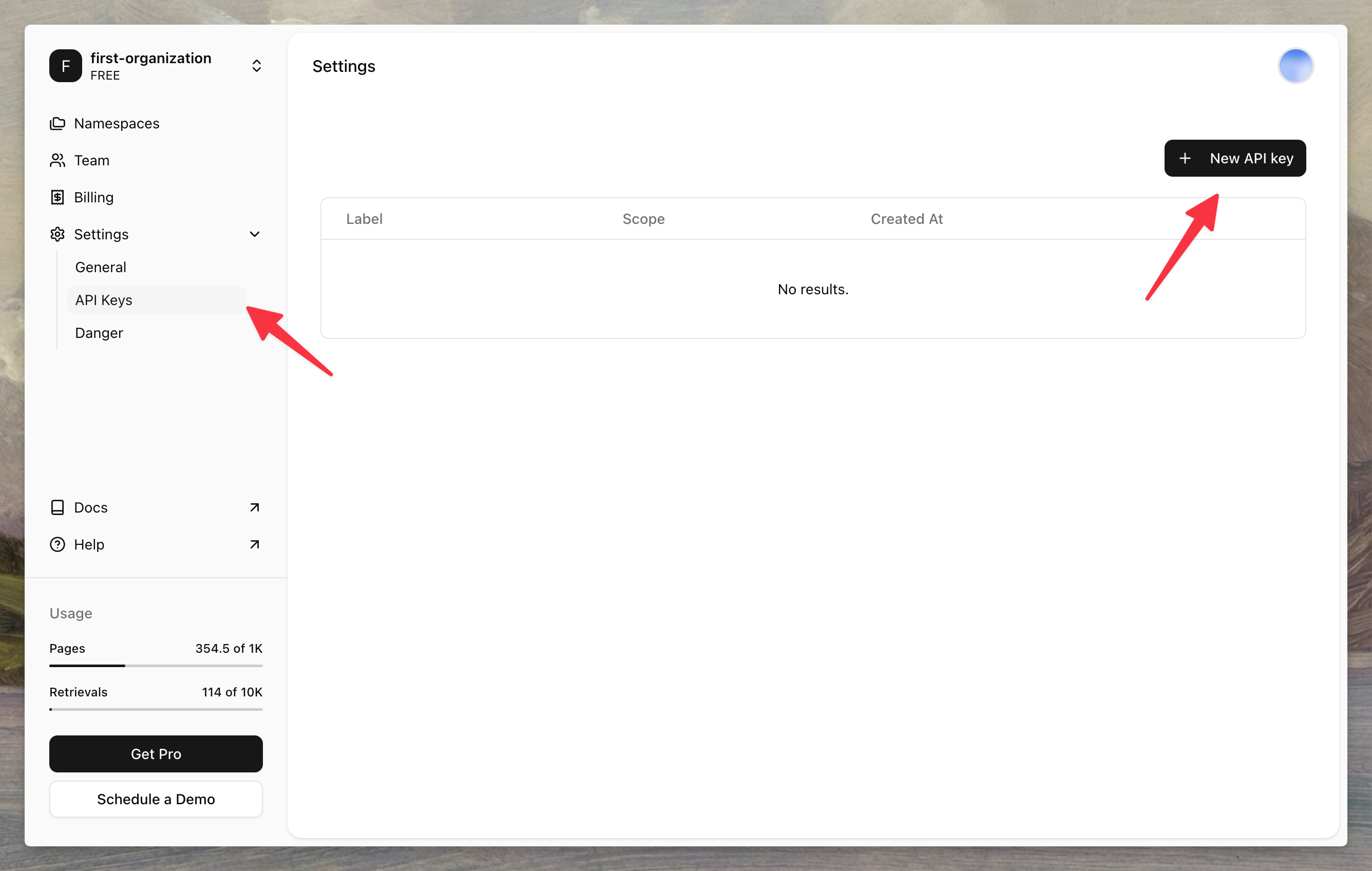 Copy your API key and namespace ID—you'll need them in the next steps.
## Step 2: Install the SDK
Install the Agentset SDK using your preferred package manager.
```bash npm theme={null}
npm install agentset
```
```bash yarn theme={null}
yarn add agentset
```
```bash pnpm theme={null}
pnpm add agentset
```
```bash bun theme={null}
bun add agentset
```
```bash pip theme={null}
pip install agentset
```
## Step 3: Upload a document
Initialize the client and upload a file to your namespace.
```typescript TypeScript theme={null}
import { Agentset } from "agentset";
const agentset = new Agentset({
apiKey: process.env.AGENTSET_API_KEY,
});
const ns = agentset.namespace("YOUR_NAMESPACE_ID");
const job = await ns.ingestion.create({
name: "Attention Is All You Need",
payload: {
type: "FILE",
fileUrl: "https://arxiv.org/pdf/1706.03762.pdf",
},
});
console.log(`Uploaded: ${job.id}`);
```
```python Python theme={null}
import os
from agentset import Agentset
client = Agentset(
namespace_id="YOUR_NAMESPACE_ID",
token=os.environ["AGENTSET_API_KEY"],
)
job = client.ingest_jobs.create(
name="Attention Is All You Need",
payload={
"type": "FILE",
"fileUrl": "https://arxiv.org/pdf/1706.03762.pdf",
}
)
print(f"Uploaded: {job.data.id}")
```
Documents are processed asynchronously. Processing time depends on the file size. Learn how to [check upload status](/data-ingestion/upload-status).
## Step 4: Search your document
Query your namespace to retrieve relevant chunks from your uploaded document.
```typescript TypeScript theme={null}
const results = await ns.search("What is multi-head attention?");
for (const result of results) {
console.log(result.text);
}
```
```python Python theme={null}
results = client.search.execute(query="What is multi-head attention?")
for result in results.data:
print(result.text)
```
## Step 5: Generate a response
Use the search results as context for an LLM to generate answers grounded in your documents.
```typescript TypeScript theme={null}
import { generateText } from "ai";
import { openai } from "@ai-sdk/openai";
const results = await ns.search("What is multi-head attention?");
const context = results.map((r) => r.text).join("\n\n");
const { text } = await generateText({
model: openai("gpt-5.1"),
system: `Answer questions based on the following context:\n\n${context}`,
prompt: "What is multi-head attention?",
});
console.log(text);
```
```python Python theme={null}
from openai import OpenAI as OpenAIClient
openai = OpenAIClient()
results = client.search.execute(query="What is multi-head attention?")
context = "\n\n".join([r.text for r in results.data])
response = openai.responses.create(
model="gpt-4.1",
input=[
{
"role": "system",
"content": f"Answer questions based on the following context:\n\n{context}",
},
{
"role": "user",
"content": "What is multi-head attention?",
},
],
)
print(response.output_text)
```
That's it. In a few minutes, you've built an end-to-end RAG pipeline that rivals systems built by dedicated ML teams.
## Next steps
* [Data Ingestion](/data-ingestion/file-uploads) — Learn about supported file types and ingestion options
* [Search and Retrieval](/search-and-retrieval/search) — Explore advanced search features like filtering and ranking
* [Agentic Search](/search-and-retrieval/agentic-search) — Let the model search on its own for complex questions
Copy your API key and namespace ID—you'll need them in the next steps.
## Step 2: Install the SDK
Install the Agentset SDK using your preferred package manager.
```bash npm theme={null}
npm install agentset
```
```bash yarn theme={null}
yarn add agentset
```
```bash pnpm theme={null}
pnpm add agentset
```
```bash bun theme={null}
bun add agentset
```
```bash pip theme={null}
pip install agentset
```
## Step 3: Upload a document
Initialize the client and upload a file to your namespace.
```typescript TypeScript theme={null}
import { Agentset } from "agentset";
const agentset = new Agentset({
apiKey: process.env.AGENTSET_API_KEY,
});
const ns = agentset.namespace("YOUR_NAMESPACE_ID");
const job = await ns.ingestion.create({
name: "Attention Is All You Need",
payload: {
type: "FILE",
fileUrl: "https://arxiv.org/pdf/1706.03762.pdf",
},
});
console.log(`Uploaded: ${job.id}`);
```
```python Python theme={null}
import os
from agentset import Agentset
client = Agentset(
namespace_id="YOUR_NAMESPACE_ID",
token=os.environ["AGENTSET_API_KEY"],
)
job = client.ingest_jobs.create(
name="Attention Is All You Need",
payload={
"type": "FILE",
"fileUrl": "https://arxiv.org/pdf/1706.03762.pdf",
}
)
print(f"Uploaded: {job.data.id}")
```
Documents are processed asynchronously. Processing time depends on the file size. Learn how to [check upload status](/data-ingestion/upload-status).
## Step 4: Search your document
Query your namespace to retrieve relevant chunks from your uploaded document.
```typescript TypeScript theme={null}
const results = await ns.search("What is multi-head attention?");
for (const result of results) {
console.log(result.text);
}
```
```python Python theme={null}
results = client.search.execute(query="What is multi-head attention?")
for result in results.data:
print(result.text)
```
## Step 5: Generate a response
Use the search results as context for an LLM to generate answers grounded in your documents.
```typescript TypeScript theme={null}
import { generateText } from "ai";
import { openai } from "@ai-sdk/openai";
const results = await ns.search("What is multi-head attention?");
const context = results.map((r) => r.text).join("\n\n");
const { text } = await generateText({
model: openai("gpt-5.1"),
system: `Answer questions based on the following context:\n\n${context}`,
prompt: "What is multi-head attention?",
});
console.log(text);
```
```python Python theme={null}
from openai import OpenAI as OpenAIClient
openai = OpenAIClient()
results = client.search.execute(query="What is multi-head attention?")
context = "\n\n".join([r.text for r in results.data])
response = openai.responses.create(
model="gpt-4.1",
input=[
{
"role": "system",
"content": f"Answer questions based on the following context:\n\n{context}",
},
{
"role": "user",
"content": "What is multi-head attention?",
},
],
)
print(response.output_text)
```
That's it. In a few minutes, you've built an end-to-end RAG pipeline that rivals systems built by dedicated ML teams.
## Next steps
* [Data Ingestion](/data-ingestion/file-uploads) — Learn about supported file types and ingestion options
* [Search and Retrieval](/search-and-retrieval/search) — Explore advanced search features like filtering and ranking
* [Agentic Search](/search-and-retrieval/agentic-search) — Let the model search on its own for complex questions