> ## Documentation Index
> Fetch the complete documentation index at: https://docs.agentset.ai/llms.txt
> Use this file to discover all available pages before exploring further.
# Hosting UI
> Test your RAG setup with a prebuilt, shareable interface
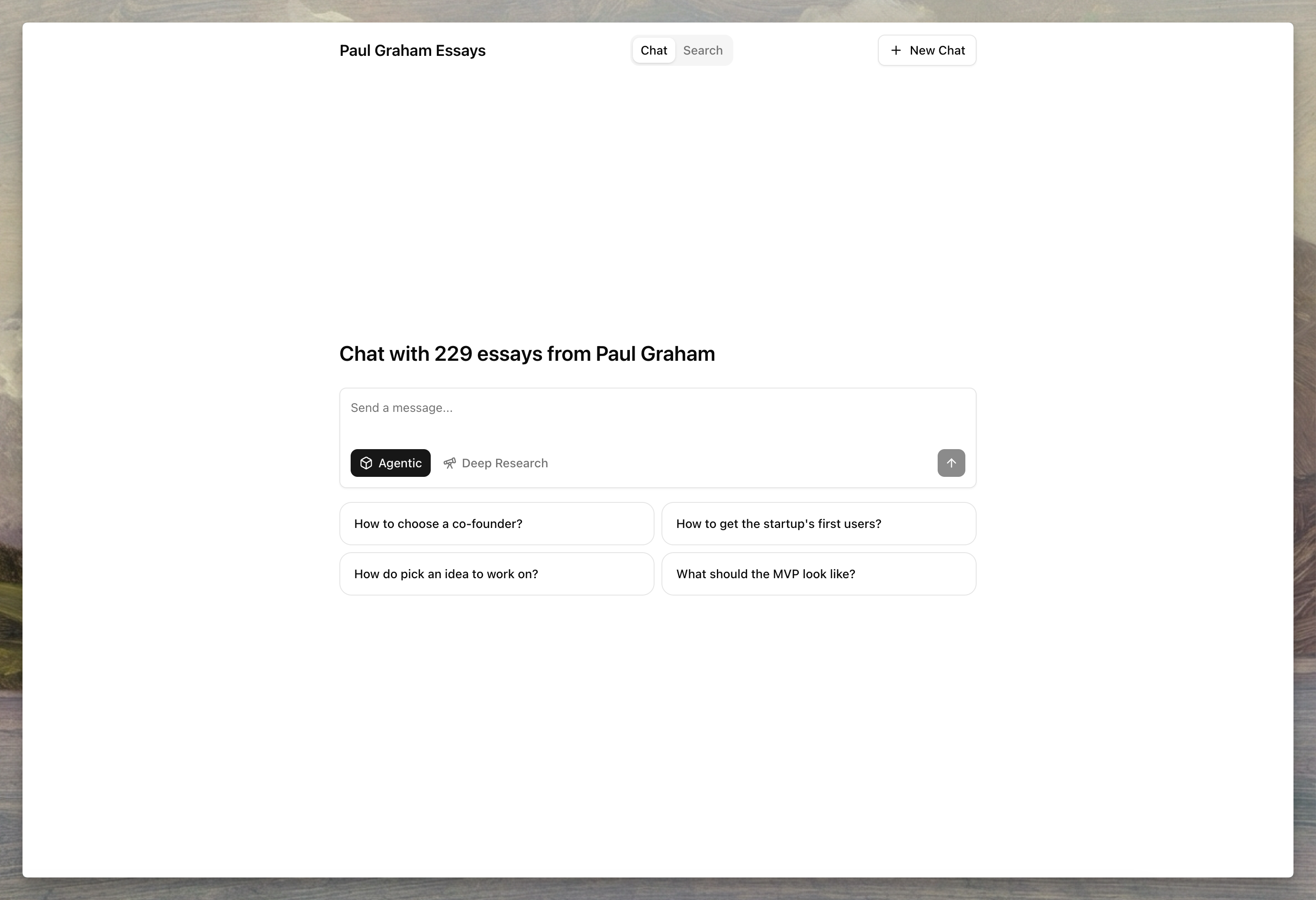
Agentset provides a prebuilt chat interface for each namespace, giving you a unique URL to test and share your RAG setup without building a custom UI.
The hosted chat answers questions with [agentic search](/search-and-retrieval/agentic-search): the model searches the namespace in a tool-calling loop, showing end users a compact progress indicator while it works, and cites sources with inline pills that open the retrieved chunk.
 ## Enable hosting
Open your namespace in the dashboard and navigate to **Hosting** to enable the hosted interface.
## Enable hosting
Open your namespace in the dashboard and navigate to **Hosting** to enable the hosted interface.
 ## Custom domain
Connect your own domain to serve the hosted interface from a branded URL.
To configure a custom domain:
1. Add your domain in the **Custom Domain** field
2. Create a CNAME record pointing to `cname.agentset.ai`
3. Save and wait for DNS propagation
## Protection
Restrict access to specific users by configuring email or domain allowlists.
| Setting | Description | Example |
| :--------- | :------------------------------------------------------- | :------------------------------------- |
| **Email** | Allow specific email addresses to access the hosted page | `alice@company.com`, `bob@example.org` |
| **Domain** | Allow all users from specific email domains | `company.com`, `example.org` |
## Customize the interface
Configure the appearance and behavior of your hosted chat interface from the dashboard.
### Hosting details
| Setting | Description |
| :-------- | :---------------------------------------------------------------------------------------------------- |
| **Title** | Display name shown in the chat interface header |
| **Slug** | Unique identifier for your hosted URL (e.g., `my-assistant` creates `app.agentset.ai/a/my-assistant`) |
| **Logo** | Custom logo image displayed in the interface |
### Chat settings
| Setting | Description |
| :------------------------- | :-------------------------------------------------------------------------------------------------------------------------- |
| **LLM Model** | Language model for generating responses |
| **Reranker Model** | Model used to rerank retrieved documents |
| **Top K** | Number of documents to retrieve from the vector store (1-100) |
| **Rerank Limit** | Number of documents to keep after reranking (1-100) |
| **System Prompt** | Instructions that define the assistant's persona and behavior |
| **Welcome Message** | Initial message shown to users when they open the chat |
| **Citation Metadata Path** | Metadata field to display as the citation label instead of chunk IDs (e.g., `title` or `source.filename` for nested fields) |
| **Example Questions** | Starter questions shown to users to help them begin a conversation |
A custom system prompt controls persona and behavior. Agentset always
appends its retrieval and citation rules, so inline citation pills keep
working — don't add citation-format instructions to a custom prompt.
### Search settings
| Setting | Description |
| :---------------- | :---------------------------------------------------- |
| **Enable Search** | Allow users to search through your documents directly |
| **Examples** | Suggested search queries shown to users |
## Manage hosting via API
### Enable hosting
```typescript TypeScript theme={null}
import { Agentset } from "agentset";
const agentset = new Agentset({
apiKey: process.env.AGENTSET_API_KEY,
});
const ns = agentset.namespace("YOUR_NAMESPACE_ID");
const hosting = await ns.hosting.enable();
console.log(hosting);
```
```python Python theme={null}
import os
from agentset import Agentset
client = Agentset(
namespace_id="YOUR_NAMESPACE_ID",
token=os.environ["AGENTSET_API_KEY"],
)
hosting = client.hosting.enable()
print(hosting)
```
### Get hosting configuration
```typescript TypeScript theme={null}
const hosting = await ns.hosting.get();
console.log(hosting);
```
```python Python theme={null}
hosting = client.hosting.get()
print(hosting)
```
### Update hosting settings
```typescript TypeScript theme={null}
const hosting = await ns.hosting.update({
title: "My Knowledge Base",
welcomeMessage: "Welcome! Ask me anything.",
systemPrompt: "You are a helpful assistant...",
exampleQuestions: [
"What is RAG?",
"How do I upload documents?",
],
});
```
```python Python theme={null}
hosting = client.hosting.update(
title="My Knowledge Base",
welcome_message="Welcome! Ask me anything.",
system_prompt="You are a helpful assistant...",
example_questions=[
"What is RAG?",
"How do I upload documents?",
],
)
```
### Disable hosting
```typescript TypeScript theme={null}
await ns.hosting.delete();
console.log("Hosting disabled");
```
```python Python theme={null}
client.hosting.delete()
print("Hosting disabled")
```
## Next steps
* [API Reference](/api-reference/endpoint/hosting/enable) — Hosting endpoint parameters and options
* [Search](/search-and-retrieval/search) — Learn about search configuration options
* [Ranking](/search-and-retrieval/ranking) — Understand how reranking improves results
* [Citations](/search-and-retrieval/citations) — Configure citation formatting
## Custom domain
Connect your own domain to serve the hosted interface from a branded URL.
To configure a custom domain:
1. Add your domain in the **Custom Domain** field
2. Create a CNAME record pointing to `cname.agentset.ai`
3. Save and wait for DNS propagation
## Protection
Restrict access to specific users by configuring email or domain allowlists.
| Setting | Description | Example |
| :--------- | :------------------------------------------------------- | :------------------------------------- |
| **Email** | Allow specific email addresses to access the hosted page | `alice@company.com`, `bob@example.org` |
| **Domain** | Allow all users from specific email domains | `company.com`, `example.org` |
## Customize the interface
Configure the appearance and behavior of your hosted chat interface from the dashboard.
### Hosting details
| Setting | Description |
| :-------- | :---------------------------------------------------------------------------------------------------- |
| **Title** | Display name shown in the chat interface header |
| **Slug** | Unique identifier for your hosted URL (e.g., `my-assistant` creates `app.agentset.ai/a/my-assistant`) |
| **Logo** | Custom logo image displayed in the interface |
### Chat settings
| Setting | Description |
| :------------------------- | :-------------------------------------------------------------------------------------------------------------------------- |
| **LLM Model** | Language model for generating responses |
| **Reranker Model** | Model used to rerank retrieved documents |
| **Top K** | Number of documents to retrieve from the vector store (1-100) |
| **Rerank Limit** | Number of documents to keep after reranking (1-100) |
| **System Prompt** | Instructions that define the assistant's persona and behavior |
| **Welcome Message** | Initial message shown to users when they open the chat |
| **Citation Metadata Path** | Metadata field to display as the citation label instead of chunk IDs (e.g., `title` or `source.filename` for nested fields) |
| **Example Questions** | Starter questions shown to users to help them begin a conversation |
A custom system prompt controls persona and behavior. Agentset always
appends its retrieval and citation rules, so inline citation pills keep
working — don't add citation-format instructions to a custom prompt.
### Search settings
| Setting | Description |
| :---------------- | :---------------------------------------------------- |
| **Enable Search** | Allow users to search through your documents directly |
| **Examples** | Suggested search queries shown to users |
## Manage hosting via API
### Enable hosting
```typescript TypeScript theme={null}
import { Agentset } from "agentset";
const agentset = new Agentset({
apiKey: process.env.AGENTSET_API_KEY,
});
const ns = agentset.namespace("YOUR_NAMESPACE_ID");
const hosting = await ns.hosting.enable();
console.log(hosting);
```
```python Python theme={null}
import os
from agentset import Agentset
client = Agentset(
namespace_id="YOUR_NAMESPACE_ID",
token=os.environ["AGENTSET_API_KEY"],
)
hosting = client.hosting.enable()
print(hosting)
```
### Get hosting configuration
```typescript TypeScript theme={null}
const hosting = await ns.hosting.get();
console.log(hosting);
```
```python Python theme={null}
hosting = client.hosting.get()
print(hosting)
```
### Update hosting settings
```typescript TypeScript theme={null}
const hosting = await ns.hosting.update({
title: "My Knowledge Base",
welcomeMessage: "Welcome! Ask me anything.",
systemPrompt: "You are a helpful assistant...",
exampleQuestions: [
"What is RAG?",
"How do I upload documents?",
],
});
```
```python Python theme={null}
hosting = client.hosting.update(
title="My Knowledge Base",
welcome_message="Welcome! Ask me anything.",
system_prompt="You are a helpful assistant...",
example_questions=[
"What is RAG?",
"How do I upload documents?",
],
)
```
### Disable hosting
```typescript TypeScript theme={null}
await ns.hosting.delete();
console.log("Hosting disabled");
```
```python Python theme={null}
client.hosting.delete()
print("Hosting disabled")
```
## Next steps
* [API Reference](/api-reference/endpoint/hosting/enable) — Hosting endpoint parameters and options
* [Search](/search-and-retrieval/search) — Learn about search configuration options
* [Ranking](/search-and-retrieval/ranking) — Understand how reranking improves results
* [Citations](/search-and-retrieval/citations) — Configure citation formatting